
Blog · Wedding Planning
Wedding Photo Hashtag Ideas: Create One That Actually Works
Learn how to create a memorable wedding photo hashtag that guests will actually use, plus why QR codes are the perfect modern complement to collect every candid moment.
· 5 min read · WedPOV Team
How to Create a Wedding Photo Hashtag That Actually Works
Quick Answer: To create a wedding photo hashtag that works, combine your names or wedding date into something short, unique, and easy to spell. Test it on Instagram first to ensure no one else is using it, then display it prominently at your venue with signs, table cards, and a QR code for instant access.
Introduction
You have spent months planning the perfect wedding. The flowers are chosen, the menu is set, and the photographer is booked. But here is the reality: your professional photographer cannot be everywhere at once. The genuine laughter during cocktail hour, the impromptu dance-offs, the quiet moments your guests capture on their phones — these are the memories that often slip away.
This is where a wedding photo hashtag becomes essential. When done right, it becomes the digital gathering place for every candid shot your friends and family take. When done poorly, it results in a scattered collection of photos you will never find.
In this practical guide, you will learn how to create a wedding photo hashtag that guests will actually use, common mistakes that derail even the best intentions, and why pairing your hashtag with a QR code creates a modern, foolproof system for collecting every photo from your big day.
Why Your Wedding Needs a Photo Hashtag
A wedding photo hashtag is more than a cute social media trend. It is a practical tool for aggregating guest-generated content into one searchable, shareable collection.
Here is what a well-executed hashtag delivers:
- Complete coverage: Professional photographers capture posed moments. Your guests capture the spontaneous, emotional, and hilarious moments in between.
- Instant sharing: Guests post photos in real-time, building excitement and engagement during the event itself.
- Easy discovery: Long after the wedding, you can revisit every photo by searching a single tag.
- Community building: Guests enjoy seeing photos from others, creating a shared digital experience.
Without a hashtag, guest photos end up scattered across individual feeds, private messages, and forgotten camera rolls. With one, you create a curated archive of your wedding from dozens of perspectives.
What Makes a Wedding Photo Hashtag Actually Work?
The difference between a hashtag that gathers hundreds of photos and one that dies quietly comes down to five key factors. Nail these, and your guests will use it consistently.
1. Keep It Short and Simple
Long hashtags are a barrier. #AlexandraAndChristopherGetMarried2026 is a typing nightmare. #AlexAndChrisSayI do is manageable but still clunky.
Aim for:
- 15 characters or fewer (not counting the #)
- Easy to spell without double-checking
- No complex words or unusual names that trip people up
Strong examples:
#TheTaylorWedding#EmmaAndJake2026#ForeverHillmans
2. Make It Unique
Before committing to a hashtag, search it on Instagram, TikTok, and X (Twitter). If it is already in use for other events, personal posts, or brands, choose something else. You want your wedding to be the only result.
Pro tip: Add your wedding year, last name, or a distinctive word to differentiate. #SmithWedding will return thousands of results. #SmithWeddingJune2026 narrows it significantly.
3. Ensure It Is Easy to Spell and Remember
Avoid homophones, words with multiple common spellings, and anything requiring guests to ask "how do you spell that?"
Avoid:
#KaitlynsKreations(unusual spelling)#GrayAndGreyWedding(confusing homophone)#PhillipAndPhilippa(repetitive and complex)
4. Test It for Unintended Meanings
Run your hashtag through these checks:
- Remove spaces and read it aloud:
#SusAnalBum(Susan + Album) is a classic example of what not to do. - Check acronyms:
#FARTwedding(Frank and Rachel Taylor) is memorable for the wrong reasons. - Share it with honest friends who will spot issues you miss.
5. Make It Emotionally Resonant
The best wedding photo hashtags connect to your story. They reference how you met, a shared interest, a meaningful phrase, or your relationship dynamic. Guests remember and use hashtags that feel personal, not generic.
Examples with meaning:
#FromTinderToTimber(couple who met on Tinder, married at a rustic venue)#TwoTeachersTieTheKnot(both are educators)#TheAdventureBegins2026(avid travelers)
How to Create Your Wedding Photo Hashtag: A Step-by-Step Guide
Follow this process to generate options, test them, and select the winner.
Step 1: Brainstorm Name Combinations
Start with your names and experiment:
- First names:
#EmmaAndJake - Last names:
#TheHarrisonWedding - Portmanteaus:
#Brangelinastyle blends like#Jemma(Jake + Emma) - Nicknames:
#MooseAndSquirrelSayIDo
Step 2: Add Wedding Details
Incorporate the year, season, location, or date to increase uniqueness:
#EmmaAndJakeJune2026#HawaiiHarrisons2026#EmmaJake626(wedding date: June 26)
Step 3: Search for Existing Usage
Check each candidate on:
- Instagram (most important for photo aggregation)
- TikTok
- X (Twitter)
If the hashtag has more than a few posts that are not yours, modify it.
Step 4: Test for Typing Ease
Text the hashtag to yourself and a friend. If autocorrect changes it or they mistype it, simplify.
Step 5: Get Feedback
Share your top 3 options with your wedding party or close friends. Ask:
- Which is easiest to remember?
- Which would you actually use?
- Do any have weird double meanings?
Step 6: Claim and Promote It
Once chosen, use the hashtag in your pre-wedding communications:
- Save-the-dates and wedding websites
- Rehearsal dinner reminders
- Signage at the venue (more on this below)
Common Mistakes That Kill Wedding Photo Hashtags
Even clever hashtags fail when these mistakes creep in. Avoid them.
| Mistake | Why It Fails | Fix |
|---|---|---|
| Too long or complex | Guests give up typing or make errors | Cap at 15 characters |
| Already in use | Your photos mix with strangers' content | Search before committing |
| Hidden double meanings | Embarrassment, mockery | Read aloud, ask friends |
| Case confusion | #alexandjake vs #AlexAndJake splits photos | Standardize and promote one version |
| No promotion at the venue | Guests forget or never learn it | Visible signage, verbal reminders |
| Not providing alternatives | Older guests, hashtag skeptics | Add QR codes as backup |
Why QR Codes Are the Perfect Complement to Wedding Photo Hashtags
Hashtags are powerful, but they have limitations. QR codes solve the problems hashtags cannot.
The Hashtag Limitations
Even a well-crafted wedding photo hashtag faces real-world friction:
- Typing barriers: Guests at a lively reception may struggle to type correctly after a cocktail or two.
- Social media gaps: Not everyone uses Instagram or remembers to post publicly.
- Privacy concerns: Some guests prefer not to share photos publicly but still want you to have them.
- Generational divides: Older relatives may not engage with hashtags at all.
How QR Codes Solve These Problems
A QR code is a scannable square that instantly opens a link when scanned with a smartphone camera. For weddings, QR codes typically link to:
- A dedicated photo upload page
- A shared Google Photos or Dropbox album
- A wedding website gallery submission form
- A specialized wedding photo app
Key benefits:
- Zero typing: Scan and upload in seconds. No spelling, no hashtags, no app downloads.
- Universal access: Anyone with a smartphone camera can use it. No social media account required.
- Private sharing: Guests upload directly to your private album without public posts.
- Higher participation: Removing friction means more guests contribute photos.
- Instant aggregation: All uploads arrive in one organized collection automatically.
Best Practices for Wedding QR Codes
To maximize QR code effectiveness at your wedding:
- Use dynamic QR codes: These can be edited later if your upload link changes. Static QR codes cannot.
- Include a call-to-action: "Scan to share your photos!" performs better than a bare code.
- Display prominently: Table cards, bar signs, ceremony programs, and photo booth stations.
- Test beforehand: Verify the code works with multiple phone models and camera apps.
- Provide a short URL fallback: Some guests prefer typing. Include a simple URL below the code.
- Size appropriately: Minimum 2x2 inches for reliable scanning from a short distance.
Hashtag + QR Code: The Winning Combination
Use both tools together for maximum coverage:
- Hashtag for social energy: Guests posting publicly build excitement and create a visible community around your wedding.
- QR code for completeness: Captures photos from guests who do not use hashtags, prefer privacy, or find typing tedious.
Together, they ensure no photo from your wedding is lost to a forgotten camera roll.
Creative Ways to Display Your Hashtag and QR Code at the Wedding
Visibility drives usage. Make your hashtag and QR code impossible to miss with these display ideas:
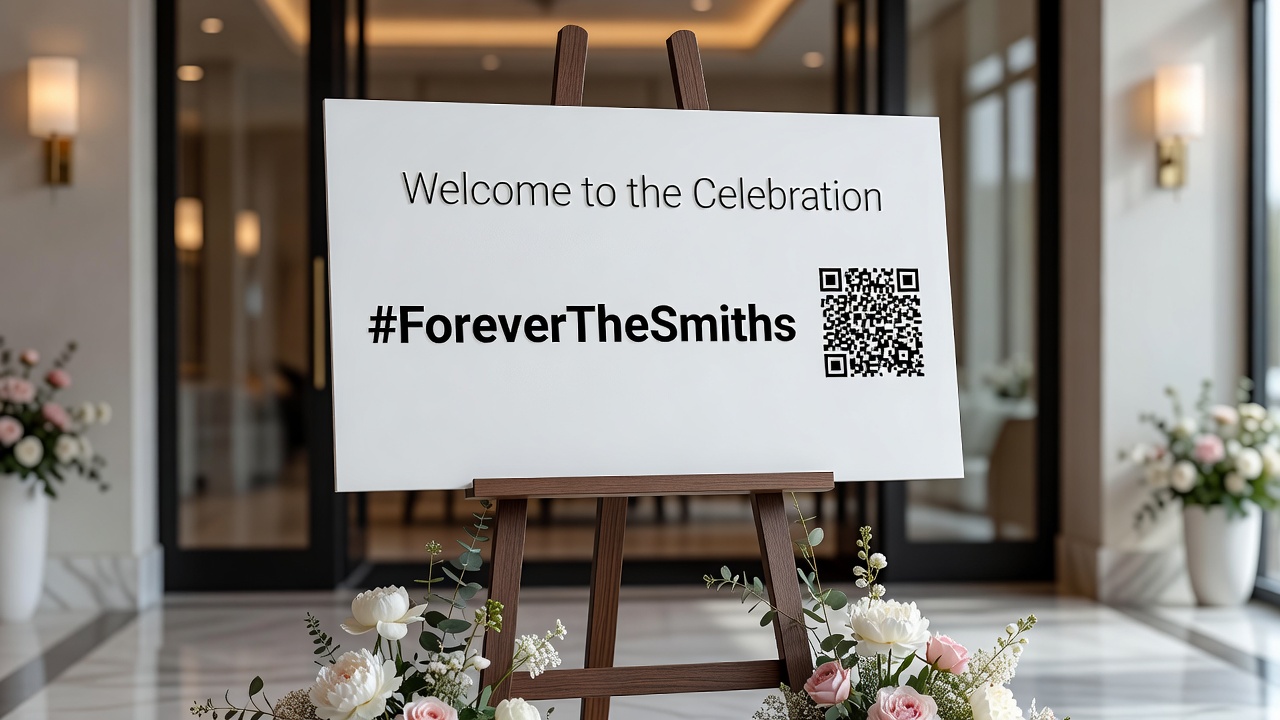
- Welcome sign: Large framed sign at the venue entrance with hashtag and QR code.
- Table cards: Every table gets a small tent card with the hashtag and scannable code.
- Cocktail napkins: Custom printed with hashtag and a tiny QR code.
- Photo booth props: Signs guests hold that display the hashtag.
- Bar and dessert table signs: High-traffic areas where guests naturally pause.
- Wedding program footer: Subtle but present for ceremony photos.
- Bathroom mirrors: Removable vinyl clings with hashtag (surprisingly effective).
- Digital displays: If your venue has screens, rotate the hashtag and QR code.
Design tip: Use a tool like QR Code Generator or Canva to create a branded QR code in your wedding colors. Many platforms let you add a small icon or logo in the center for personalization.
Key Takeaways
- A wedding photo hashtag should be short (under 15 characters), unique, easy to spell, and emotionally meaningful to maximize guest participation.
- Always search your chosen hashtag on Instagram and other platforms before committing to avoid collisions with existing content.
- Test hashtags with friends for hidden double meanings, spelling confusion, and typing difficulty.
- Promote your hashtag prominently at the venue with signage, table cards, and verbal reminders.
- Pair your hashtag with a QR code to eliminate typing barriers and capture photos from guests who do not use social media.
- Use dynamic QR codes that can be updated, and display them in high-traffic areas like bars, photo booths, and table settings.
- The combination of hashtags and QR codes ensures comprehensive photo coverage from every guest perspective.
Frequently Asked Questions
How long should a wedding photo hashtag be?
Keep it under 15 characters excluding the # symbol. Shorter hashtags are easier to type, harder to misspell, and more likely to be used by guests throughout your event.
Should I use our full names in the hashtag?
Full names often create long, unwieldy hashtags. Consider first names, last names, nicknames, or meaningful abbreviations instead. The goal is memorable simplicity.
What if someone else is already using our hashtag?
Modify it by adding your wedding year, venue location, or a distinctive word. Search again to confirm uniqueness before printing any signage or stationery.
Do guests need Instagram to use a wedding photo hashtag?
Instagram is the primary platform for photo hashtags, but TikTok and X also support them. For guests without social media, a QR code linking to a private upload page is the ideal alternative.
Where should I display the hashtag at my wedding?
Display it everywhere guests gather: welcome signs, table cards, bar areas, photo booths, restroom mirrors, and ceremony programs. Repetition increases usage significantly.
How do I create a QR code for wedding photos?
Use a free QR code generator like QR Code Generator, Bitly, or Canva. Link it to a Google Photos album, Dropbox folder, or dedicated wedding photo app. Choose dynamic codes so you can update the link if needed.
Should I have one hashtag or multiple?
Stick to one primary hashtag. Multiple hashtags split your photo collection and confuse guests. If you want a separate tag for pre-wedding events, keep it similar to the main one.
Can I change my hashtag after sending save-the-dates?
It is difficult but possible. You would need to communicate the change clearly on your wedding website, at the venue, and verbally. Avoid this by testing your hashtag thoroughly before finalizing stationery.
Are wedding photo hashtags still relevant in 2026?
Yes, but they work best when paired with QR codes. Hashtags provide public social energy, while QR codes ensure comprehensive private collection. Together they cover all guest preferences.
How do I collect photos from guests who do not use social media?
A QR code linking to a private upload page or shared album is the most effective method. It requires no social account and lets guests contribute directly without public posting.
Conclusion
A wedding photo hashtag is a small detail with outsized impact. The right hashtag transforms scattered guest photos into a searchable, shareable digital album you will revisit for years. The wrong one fades into obscurity, leaving you with only the professional shots and a vague memory of moments missed.
Follow the practical steps in this guide: keep it short, make it unique, test it thoroughly, and promote it relentlessly at your venue. Then go one step further by adding a QR code as a modern, frictionless backup. Your guests will thank you for making it easy, and your wedding album will thank you for being complete.
Ready to start planning? Browse our collection of wedding planning guides for more practical tips, or check out our recommended wedding photo apps to find the perfect platform for your QR code uploads.
Quick answers
- How long should a wedding photo hashtag be?
- Keep it under 15 characters excluding the # symbol. Shorter hashtags are easier to type, harder to misspell, and more likely to be used by guests throughout your event.
- Should I use our full names in the hashtag?
- Full names often create long, unwieldy hashtags. Consider first names, last names, nicknames, or meaningful abbreviations instead. The goal is memorable simplicity.
- What if someone else is already using our hashtag?
- Modify it by adding your wedding year, venue location, or a distinctive word. Search again to confirm uniqueness before printing any signage or stationery.
- Do guests need Instagram to use a wedding photo hashtag?
- Instagram is the primary platform for photo hashtags, but TikTok and X also support them. For guests without social media, a QR code linking to a private upload page is the ideal alternative.
- Where should I display the hashtag at my wedding?
- Display it everywhere guests gather: welcome signs, table cards, bar areas, photo booths, restroom mirrors, and ceremony programs. Repetition increases usage significantly.
- How do I create a QR code for wedding photos?
- Use a free QR code generator like QR Code Generator, Bitly, or Canva. Link it to a Google Photos album, Dropbox folder, or dedicated wedding photo app. Choose dynamic codes so you can update the link if needed.
- Should I have one hashtag or multiple?
- Stick to one primary hashtag. Multiple hashtags split your photo collection and confuse guests. If you want a separate tag for pre-wedding events, keep it similar to the main one.
- Can I change my hashtag after sending save-the-dates?
- It is difficult but possible. You would need to communicate the change clearly on your wedding website, at the venue, and verbally. Avoid this by testing your hashtag thoroughly before finalizing stationery.
- Are wedding photo hashtags still relevant in 2026?
- Yes, but they work best when paired with QR codes. Hashtags provide public social energy, while QR codes ensure comprehensive private collection. Together they cover all guest preferences.
- How do I collect photos from guests who do not use social media?
- A QR code linking to a private upload page or shared album is the most effective method. It requires no social account and lets guests contribute directly without public posting.